Monday, October 10, 2022

Configure WildFly in Domain mode


reference: http://www.mastertheboss.com/jbossas/jboss-as-7/jboss-as-7-domain-configuration/

How to configure WildFly in Domain mode

WildFly Domain consists in grouping several WildFly instances into one single group (or a “server-group” using the WildFly nomenclature). In fact, we group the WildFly server into one logical server-group, and all the WildFly instances will share the same configuration. By this we intend that they share the same WildFly profile ( default , ha , full , and full-ha ), same deployments, and so on. In this tutorial we will show all the steps to configure a WildFly Domain.

In order to configure our domain we will at first configure the Domain Controller and its domain.xml configuration file. Next we will configure the hosts where the applications will be deployed.

Domain controller set up (domain.xml)

The server configuration of the domain is centralized in the domain.xml file of the domain controller. The domain.xml is located in the directory $JBOSS_HOME/domain/configuration. It includes the main configuration for all server instances. This file is only required for the Domain Controller.
In the domain.xml file we will define the server group configuration (which can be anyway changed at runtime, as we will see in a minute).

<server-groups>
<server-group name="main-server-group" profile="full">
<jvm name="default">
<heap size="64m" max-size="512m"/>
</jvm>
<socket-binding-group ref="full-sockets"/>
</server-group>
<server-group name="other-server-group" profile="full-ha">
<jvm name="default">
<heap size="64m" max-size="512m"/>
</jvm>
<socket-binding-group ref="full-sockets"/>
</server-group>
</server-groups>

This domain configuration reflects the following schema:

jboss as 7 domain configuration jboss as 7 domain configuration jboss as 7 domain configuration
As you can see, we have two server groups: main-server-group and other-server-group. You can in turn associate each server group with a different profile.
The default configuration includes four preconfigured profiles:

  • default – Support of Java EE Web-Profile plus some extensions like RESTFul Web Services or support for EJB3 remote invocations
  • full – Support of Java EE Full-Profile and all server capabilities without clustering
  • ha – default profile with clustering capabilities
  • full-ha – full profile with clustering capabilities

A profile contains the configuration of the supported subsystems that is added by an extension. We choose the full profile which contains all WildFly / JBoss EAP capabilities, except for clustering.
The referenced profile will be assigned by the server group to one socket-binding group. A socket-binding group references to logical interface names instead direct to the interfaces of a host. These logical interfaces are defined in the <interfaces> section of the domain.xml configuration file.

<interfaces>
<interface name="management"/>
<interface name="public"/>
<interface name="unsecure"/>
</interfaces>

The exact binding of the interfaces with the IP address is done into the host.xml file, however we will leave it with the default values and use start up properties to override these values.

Configuring the host.xml of the Domain controller

The first thing we need to check, is that the host controller acts as domain controller. This is stated by the domain-controller element:

<domain-controller>
<local/>
</domain-controller>

Next, since we won’t add any server on this host, we need to state it, using an empty servers element:

<servers />

Last thing we need to do, is creating a management user which will be used to authenticate from the other host controllers, when connecting to the domain controller. For this purpose we will use the add-user.sh shell script which is located in the bin folder of JBOSS_HOME folder:

$./add-user.sh
 
What type of user do you wish to add? 
 a) Management User (mgmt-users.properties) 
 b) Application User (application-users.properties)
(a): a

Enter the details of the new user to add.
Realm (ManagementRealm) : 
Username : admin1234
Password : 
Re-enter Password : 
Are you sure you want to add user 'domain' yes/no? y

About to add user admin1234 for realm 'ManagementRealm'
Is this correct yes/no? y
Added user 'admin1234' to file '/standalone/configuration/mgmt-users.properties'
Added user 'admin1234' to file '/domain/configuration/mgmt-users.properties'

Is this new user going to be used for one AS process to connect to another AS process e.g.
slave domain controller?
yes/no? y

To represent the user add the following to the server-identities definition  
<secret value="ZnJhbmsxMjMh" />

TIP! You can use the add-user.sh in non interactive mode to create the management user and show the secret. Ex: add-user.sh -u admin1234 -p Password1!

Now we can start the domain controller with the following command. We will set the physical network bind address to the host configuration with the jboss.bind.address.management property. The management interface must be reachable for all hosts in the domain in order to establish a connection with the domain controller.

domain.sh -b 192.168.1.1 -Djboss.bind.address.management=192.168.1.1

(Please note the -b parameter is an alias for the -Djboss.bind.address parameter)

Slave configurations

After configuring the Master node, we will configure the Slave servers, where applications will be deployed. For this purpose we will set up two Slave Hosts. On each host we need also an installation of JBoss EAP / WildFly
On each host we need to configure the host.xml file (as an alternative you can name the host file as you like and start the domain with the the –host-config parameter. Example ./domain.sh –host-config=host-slave.xml ).
The first thing is to choose a unique name for each host in our domain to avoid name conflicts. So, configure the name “server1” on the first host.xml file:

<host name="server1" xmlns="urn:jboss:domain:1.4">
...
</host>
And for the other host:
<host name="server2" xmlns="urn:jboss:domain:1.4">
...
</host>

Next, we need to specify that the host controllers will connect to the remote domain controller. We will not specify the actual IP address of the Domain controller but leave it as a property named jboss.domain.master.port.
Additionally, we need to specify the username which will be used to connect to the Domain controller. So let’s add the user admin1234 which we have created on the Domain controller machine.

<domain-controller>
<remote host="${jboss.domain.master.address}" port="${jboss.domain.master.port:9999}"
username="admin1234" security-realm="ManagementRealm"/>
</domain-controller>

Finally, we need to specify the Base64 password for the server identity we have included in the remote element:

<management>
<security-realms>
<security-realm name="ManagementRealm">
<server-identities>
<secret value="ZnJhbmsxMjMh" />
</server-identities>
<authentication>
<properties path="mgmt-users.properties" relative-to="jboss.domain.config.dir"/>
</authentication>
</security-realm>
<security-realm name="ApplicationRealm">
<authentication>
<properties path="application-users.properties" relative-to="jboss.domain.config.dir" />
</authentication>
</security-realm>
</security-realms>
<management-interfaces>
<native-interface security-realm="ManagementRealm">
<socket interface="management" port="${jboss.management.native.port:9999}"/>
</native-interface>
</management-interfaces>
</management>

The last step is to add the server nodes inside the host.xml file on both hosts.

So we will configure on the first host (server1):

<servers>
<server name="server-one" group="main-server-group"/>
<server name="server-two" group="main-server-group" auto-start="false">
<socket-bindings port-offset="150"/>
</server>
</servers>

And on the second host (server2)

<servers>
<server name="server-three" group="other-server-group"/>
<server name="server-four" group="other-server-group" auto-start="false">
<socket-bindings port-offset="150"/>
</server>
</servers>

Please notice the auto-start flag indicates that the server instances will not be started automatically if the host controller is started.
For the second server a port-offset of 150 is configured to avoid port conflicts. With the port offset we can reuse the socket-binding group of the domain configuration for multiple server instances on one host.

Ok, now we are done with our configuration and we can start the first host with:

domain.sh \
  -b 192.168.0.2  
   -Djboss.domain.master.address=192.168.0.1 
   -Djboss.bind.address.management=192.168.0.2

and the second one with:

domain.sh \
  -b 192.168.0.3  
   -Djboss.domain.master.address=192.168.0.1 
   -Djboss.bind.address.management=192.168.0.3

If you look at the Domain controller console, you should notice the following output which shows that the Domain controller has started and the other slave hosts have successfully connected:

[Host Controller] 14:43:40,740 INFO [org.jboss.as.host.controller] (Controller Boot Thread) WFLYHC0023: Starting server server-two
[Host Controller] 14:43:40,763 INFO [org.jboss.as.host.controller] (server-registration-threads - 1) WFLYHC0020: Registered remote slave host server-one
14:43:41,053 INFO [org.jboss.as.process.Server:server-two.status] (ProcessController-threads - 3) WFLYPC0018: Starting process 'Server:server-two'
[Host Controller] 14:43:43,757 INFO [org.jboss.as.host.controller] (management task-1) WFLYHC0021: Server [Server:server-two] connected using connection [Channel ID 00466fa4 (inbound) of Remoting connection 2f2990bf to localhost/127.0.0.1:46062 of endpoint "master:MANAGEMENT" ]
[Host Controller] 14:43:43,867 INFO [org.jboss.as.host.controller] (server-registration-threads - 1) WFLYHC0020: Registered remote slave host server-two
[Host Controller] 14:43:43,881 INFO [org.jboss.as] (Controller Boot Thread) WFLYSRV0025: WildFly Full 20.0.0.Final (WildFly Core 12.0.1.Final) (Host Controller) started in 8551ms - Started 80 of 82 services (25 services are lazy, passive or on-demand)

Monday, April 18, 2022

Self Signed certificate

Create root certificate

1) PS C:\WINDOWS\system32> New-SelfSignedCertificate -DnsName "localhost", "localhost" -CertStoreLocation "cert:\LocalMachine\My" -NotAfter (Get-Date).AddYears(20) -FriendlyName "Rlocalhost" -KeyUsageProperty All -KeyUsage CertSign, CRLSign, DigitalSignature


PSParentPath: Microsoft.PowerShell.Security\Certificate::LocalMachine\My

Thumbprint                                Subject

----------                                -------

8C3452CA05A70484DA828FA91E54394C683A06E2  CN=localhost

2)  PS C:\WINDOWS\system32> $CertPwd = ConvertTo-SecureString -String "password" -Force -AsPlainText

3) PS C:\WINDOWS\system32> Get-ChildItem -Path cert:\localMachine\my\8C3452CA05A70484DA828FA91E54394C683A06E2 | Export-PfxCertificate -FilePath C:\FamLink\docs\certificates\root.pfx -Password $CertPwd

    Directory: C:\FamLink\docs\certificates

Mode                 LastWriteTime         Length Name

----                 -------------         ------ ----

-a----         4/14/2022   2:56 PM           2701 root.pfx

4) PS C:\WINDOWS\system32> $rootcert = ( Get-ChildItem -Path cert:\LocalMachine\My\8C3452CA05A70484DA828FA91E54394C683A06E2 )

5) PS C:\WINDOWS\system32> New-SelfSignedCertificate -certstorelocation cert:\localmachine\my -dnsname "localhost" -Signer $rootcert -NotAfter (Get-Date).AddYears(20) -FriendlyName "Clocalhost"

   PSParentPath: Microsoft.PowerShell.Security\Certificate::LocalMachine\my

Thumbprint                                Subject

----------                                -------

BC8354ABD4A274226D9B25887EEB33CF9C8FF4BA  CN=localhost

Create child certificate

6) PS C:\WINDOWS\system32> $mypwd = ConvertTo-SecureString -String "password" -Force -AsPlainText

7) PS C:\WINDOWS\system32> Get-ChildItem -Path cert:\localMachine\my\BC8354ABD4A274226D9B25887EEB33CF9C8FF4BA | Export-PfxCertificate -FilePath C:\FamLink\docs\certificates\child.pfx -Password $mypwd

    Directory: C:\FamLink\docs\certificates

Mode                 LastWriteTime         Length Name

----                 -------------         ------ ----

-a----         4/14/2022   3:03 PM           3597 child.pfx

7) PS C:\WINDOWS\system32> Get-ChildItem -Path cert:\localMachine\my\8C3452CA05A70484DA828FA91E54394C683A06E2


Wednesday, January 26, 2022

 SELECT [n].[value] ('(@name)[1]', 'varchar(50)') AS [event_name]


      ,[n].[value] ('(data[@name="batch_text"]/value)[1]', 'nvarchar(max)') AS batch_text 


       ,[n].[value] ('(action[@name="database_name"]/value)[1]', 'nvarchar(128)') AS [database_name]


      ,[n].[value] ('(@package)[1]', 'varchar(50)') AS [package_name]


      ,[n].[value] ('(@timestamp)[1]', 'datetime2') AS [utc_timestamp]


      ,[n].[value] ('(data[@name="duration"]/value)[1]', 'BIGINT') AS [duration]


      ,[n].[value] ('(data[@name="cpu_time"]/value)[1]', 'BIGINT') AS [cpu]


      ,[n].[value] ('(data[@name="physical_reads"]/value)[1]', 'BIGINT') AS [physical_reads]


      ,[n].[value] ('(data[@name="logical_reads"]/value)[1]', 'BIGINT') AS [logical_reads]


      ,[n].[value] ('(data[@name="writes"]/value)[1]', 'BIGINT') AS [writes]


      ,[n].[value] ('(data[@name="row_count"]/value)[1]', 'BIGINT') AS [row_count]


      ,[n].[value] ('(data[@name="last_row_count"]/value)[1]', 'BIGINT') AS [last_row_count]


      ,[n].[value] ('(data[@name="line_number"]/value)[1]', 'BIGINT') AS [line_number]


      ,[n].[value] ('(data[@name="offset"]/value)[1]', 'BIGINT') AS [offset]


      ,[n].[value] ('(data[@name="offset_end"]/value)[1]', 'BIGINT') AS [offset_end]


      ,[n].[value] ('(data[@name="statement"]/value)[1]', 'nvarchar(max)') AS [statement]


      ,[n].[value] ('(action[@name="database_name"]/value)[1]', 'nvarchar(128)') AS [database_name]


    FROM


       (


           SELECT CAST([fn_xe_file_target_read_file].[event_data] AS XML) AS [event_data]


               FROM [sys].fn_xe_file_target_read_file ('D:\Extended Event File Logs\LightPerformanceEvents*.xel', NULL, NULL, NULL)


       ) [ed]


        CROSS APPLY [ed].[event_data].nodes ('event') AS [q]([n])


WHERE [n].[value] ('(@timestamp)[1]', 'datetime2') > DATEADD(day, -1, GETDATE())


--AND [n].[value] ('(@name)[1]', 'varchar(50)') = 'sql_batch_completed'


--AND (


--[n].[value] ('(data[@name="batch_text"]/value)[1]', 'nvarchar(max)') LIKE 'select Temp5.ChildLocationId%' --OR


--[n].[value] ('(data[@name="batch_text"]/value)[1]', 'nvarchar(max)') LIKE 'FLSP_CHILDLOCATION_DASHBOARD_DYMAMIC%' or

--

--[n].[value] ('(data[@name="batch_text"]/value)[1]', 'nvarchar(max)') LIKE '%APP_LOGS%'


--)


ORDER BY utc_timestamp DESC


Tuesday, November 9, 2021

 EXEC sp_configure 

     'show advanced option', 

     '1';  

RECONFIGURE WITH OVERRIDE;

EXEC sp_configure 'xp_cmdshell', 1;  

GO  

RECONFIGURE;


--EXEC xp_cmdshell 'dir \\server.company.com\sharedfolder\';

--EXEC sp_xp_cmdshell_proxy_account 'dmain\userid','password'

--Exec master.dbo.xp_cmdshell 'net use t: /delete'

--EXEC xp_cmdshell 'net use t: \\DSHSUTLCY3RST01.DSHS.WA.LCL\BACKUPS\DSHSDBOLY3LGC01 password /user:domain\userid /persistent:no'

--set @fileName ='t:\CAAIRS\CAAIRS-PROD_Full_Database_' + @ts + '.bak'

--BACKUP DATABASE [CAAIRS] TO  DISK = @fileName WITH NOFORMAT, INIT,  NAME = N'CAAIRS-Full Database Backup', SKIP, NOREWIND, NOUNLOAD, COMPRESSION,  STATS = 10

--Exec master.dbo.xp_cmdshell 'net use t: /delete'

--EXEC xp_cmdshell 'del "d:\Extended Event File Logs\childlocation*"';

EXEC xp_cmdshell 'dir "d:\Extended Event File Logs\*.*"';

--EXEC xp_cmdshell 'mkdir "d:\Extended Event File Logs"';

GO  


EXEC sp_configure 'xp_cmdshell', 0;  

GO  

RECONFIGURE;

EXEC sp_configure 

     'show advanced option', 

     '0';  

RECONFIGURE WITH OVERRIDE;

Wednesday, October 6, 2021

Six SQL Server performance tuning tips from Pinal Dave

https://canro91.github.io/2020/09/28/SQLServerTuningTips/


Six SQL Server performance tuning tips from Pinal Dave

Recently, I’ve needed to optimize some SQL Server queries. I decided to look out there what to do to tune SQL Server and SQL queries. This is what I found.

At the database level, turn on automatic update of statistics, increase the file size autogrowth and update the compatibility level. At the table level, delete your unused indexes and create the missing ones, keeping around 5 indexes per table. And, at the query level, find and fix implicit conversions.

While looking up what I could do to tune my queries, I found Pinal Dave from SQLAuthority. Chances are you have already found one of his blog posts when searching for SQL Server tuning tips. He’s been blogging about the subject for years.

These are six tips from Pinal’s blog and online presentations I’ve applied recently. Please, test these changes in a development or staging environment before making anything on your production servers.

1. Enable automatic update of statistics

Turn on automatic update of statistics. You should turn it off if you’re updating a really long table during your work-hours.

This is how to enable automatic update of statistic update. [Source]

USE <YourDatabase>;
GO

-- Enable Auto Create of Statistics
ALTER DATABASE <YourDatabase>
SET AUTO_CREATE_STATISTICS ON WITH NO_WAIT;

-- Enable Auto Update of Statistics
ALTER DATABASE <YourDatabase>
SET AUTO_UPDATE_STATISTICS ON WITH NO_WAIT;
GO

-- Update Statistics for whole database
EXEC sp_updatestats
GO

2. Fix File Autogrowth

Add size and file growth to your database. Make it your weekly file growth. Otherwise, change it to 200 or 250MB.

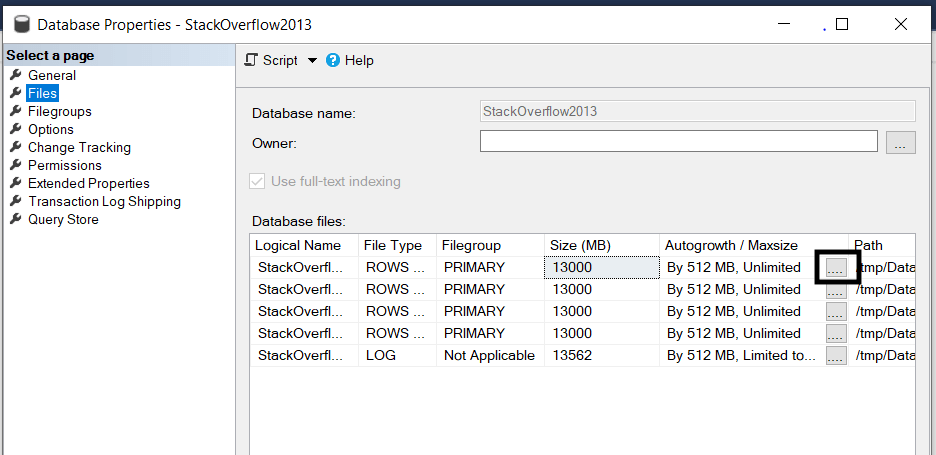
From SQL Server Management Studio, to change the file autogrowth, go to your database properties and then to Files. Click on the three dots in the Autogrowth column. And, change the file growth.

Files page from Database properties in SQL Server Management Studio

3. Find and Fix Implicit conversions

Implicit conversions happen when SQL Server needs to convert between two data types in a WHERE or in JOIN.

For example, the query below with OrderNumber as a VARCHAR(20) has implicit warning when we compare it to a INT parameter.

DECLARE @OrderNumber INT = 123;

SELECT *
FROM dbo.Orders
WHERE OrderNumber = @OrderNumber;
GO

To run this query, SQL Server has to go through all the rows in the dbo.Orders table to convert the OrderNumber from VARCHAR(20) to INT.

To decide when implicit conversion happens, you can check Microsoft Data Type Precedence table. Types with lower precedence convert to types with higher precedence. For example, VARCHAR will be always converted to INT and to NVARCHAR.

Use the below script to indentify queries with implicit conversion. [Source].

SELECT TOP(50) DB_NAME(t.[dbid]) AS [Database Name], 
t.text AS [Query Text],
qs.total_worker_time AS [Total Worker Time], 
qs.total_worker_time/qs.execution_count AS [Avg Worker Time], 
qs.max_worker_time AS [Max Worker Time], 
qs.total_elapsed_time/qs.execution_count AS [Avg Elapsed Time], 
qs.max_elapsed_time AS [Max Elapsed Time],
qs.total_logical_reads/qs.execution_count AS [Avg Logical Reads],
qs.max_logical_reads AS [Max Logical Reads], 
qs.execution_count AS [Execution Count], 
qs.creation_time AS [Creation Time],
qp.query_plan AS [Query Plan]
FROM sys.dm_exec_query_stats AS qs WITH (NOLOCK)
CROSS APPLY sys.dm_exec_sql_text(plan_handle) AS t 
CROSS APPLY sys.dm_exec_query_plan(plan_handle) AS qp 
WHERE CAST(query_plan AS NVARCHAR(MAX)) LIKE ('%CONVERT_IMPLICIT%')
 AND t.[dbid] = DB_ID()
ORDER BY qs.total_worker_time DESC OPTION (RECOMPILE);

4. Change compatibility level

After updating your SQL Server, make sure to update the compatibility level of your database to the highest level supported by the current version of your SQL Server.

You can change your SQL Server compatibility level using SQL Server Management Studio or with TSQL query. [Source].

ALTER DATABASE <YourDatabase>
SET COMPATIBILITY_LEVEL = { 150 | 140 | 130 | 120 | 110 | 100 | 90 }

5. Find and Create missing indexes

Create your missing indexes. But, don’t create them all. Create the first 10 missing indexes in your database. Stick to having around 5 indexes per table.

You can use the next script to find the missing indexes in your database. [Source]. But, don’t blindly add new indexes. Check the indexes you already have and the estimated impact of the missing indexes.

SELECT TOP 25
dm_mid.database_id AS DatabaseID,
dm_migs.avg_user_impact*(dm_migs.user_seeks+dm_migs.user_scans) Avg_Estimated_Impact,
dm_migs.last_user_seek AS Last_User_Seek,
OBJECT_NAME(dm_mid.OBJECT_ID,dm_mid.database_id) AS [TableName],
'CREATE INDEX [IX_' + OBJECT_NAME(dm_mid.OBJECT_ID,dm_mid.database_id) + '_'
+ REPLACE(REPLACE(REPLACE(ISNULL(dm_mid.equality_columns,''),', ','_'),'[',''),']','') 
+ CASE
WHEN dm_mid.equality_columns IS NOT NULL
AND dm_mid.inequality_columns IS NOT NULL THEN '_'
ELSE ''
END
+ REPLACE(REPLACE(REPLACE(ISNULL(dm_mid.inequality_columns,''),', ','_'),'[',''),']','')
+ ']'
+ ' ON ' + dm_mid.statement
+ ' (' + ISNULL (dm_mid.equality_columns,'')
+ CASE WHEN dm_mid.equality_columns IS NOT NULL AND dm_mid.inequality_columns 
IS NOT NULL THEN ',' ELSE
'' END
+ ISNULL (dm_mid.inequality_columns, '')
+ ')'
+ ISNULL (' INCLUDE (' + dm_mid.included_columns + ')', '') AS Create_Statement
FROM sys.dm_db_missing_index_groups dm_mig
INNER JOIN sys.dm_db_missing_index_group_stats dm_migs
ON dm_migs.group_handle = dm_mig.index_group_handle
INNER JOIN sys.dm_db_missing_index_details dm_mid
ON dm_mig.index_handle = dm_mid.index_handle
WHERE dm_mid.database_ID = DB_ID()
ORDER BY Avg_Estimated_Impact DESC
GO

6. Delete most of your indexes

Indexes reduce perfomance all the time. They reduce performance of inserts, updates, deletes and selects. Even if a query isn’t using an index, it reduces performance of the query.

Delete most your indexes. Identify your main table and check if it has more than 5 indexes. But, don’t create indexes on every key of a JOIN.

Also, keep in mind if you rebuild an index for a table, SQL Server will remove all plans cached related to that table.

Rebuilding your indexes is the most expensive way of updating statistics.

You can find your unused indexes with the next script. [Source]. Look for indexes with zero seeks/scans and lots of updates. They’re good candidates to drop.

SELECT TOP 25
o.name AS ObjectName
, i.name AS IndexName
, i.index_id AS IndexID
, dm_ius.user_seeks AS UserSeek
, dm_ius.user_scans AS UserScans
, dm_ius.user_lookups AS UserLookups
, dm_ius.user_updates AS UserUpdates
, p.TableRows
, 'DROP INDEX ' + QUOTENAME(i.name)
+ ' ON ' + QUOTENAME(s.name) + '.'
+ QUOTENAME(OBJECT_NAME(dm_ius.OBJECT_ID)) AS 'drop statement'
FROM sys.dm_db_index_usage_stats dm_ius
INNER JOIN sys.indexes i ON i.index_id = dm_ius.index_id 
AND dm_ius.OBJECT_ID = i.OBJECT_ID
INNER JOIN sys.objects o ON dm_ius.OBJECT_ID = o.OBJECT_ID
INNER JOIN sys.schemas s ON o.schema_id = s.schema_id
INNER JOIN (SELECT SUM(p.rows) TableRows, p.index_id, p.OBJECT_ID
FROM sys.partitions p GROUP BY p.index_id, p.OBJECT_ID) p
ON p.index_id = dm_ius.index_id AND dm_ius.OBJECT_ID = p.OBJECT_ID
WHERE OBJECTPROPERTY(dm_ius.OBJECT_ID,'IsUserTable') = 1
AND dm_ius.database_id = DB_ID()
AND i.type_desc = 'nonclustered'
AND i.is_primary_key = 0
AND i.is_unique_constraint = 0
ORDER BY (dm_ius.user_seeks + dm_ius.user_scans + dm_ius.user_lookups) ASC
GO

VoilĂ ! These are six tips I learned from Pinal Dave to start tuning your SQL Server. Pay attention to your implicit conversions. You can get a surprise.

I gained a lot of improvement only by fixing implicit conversions. In a store procedure, we had a NVARCHAR parameter to compare it with a VARCHAR column. Yes, implicit conversions happen between VARCHAR and NVARCHAR.

For more SQL content, check my posts on how to write dynamic SQL queries and the differences between TRUNCATE and DELETE.

Happy SQL time!

Tuesday, October 5, 2021

extended event

 SELECT [n].[value] ('(@name)[1]', 'varchar(50)') AS [event_name]

      ,[n].[value] ('(data[@name="batch_text"]/value)[1]', 'nvarchar(max)') AS batch_text 

       ,[n].[value] ('(action[@name="database_name"]/value)[1]', 'nvarchar(128)') AS [database_name]

      ,[n].[value] ('(@package)[1]', 'varchar(50)') AS [package_name]

      ,[n].[value] ('(@timestamp)[1]', 'datetime2') AS [utc_timestamp]

      ,[n].[value] ('(data[@name="duration"]/value)[1]', 'BIGINT') AS [duration]

      ,[n].[value] ('(data[@name="cpu_time"]/value)[1]', 'BIGINT') AS [cpu]

      ,[n].[value] ('(data[@name="physical_reads"]/value)[1]', 'BIGINT') AS [physical_reads]

      ,[n].[value] ('(data[@name="logical_reads"]/value)[1]', 'BIGINT') AS [logical_reads]

      ,[n].[value] ('(data[@name="writes"]/value)[1]', 'BIGINT') AS [writes]

      ,[n].[value] ('(data[@name="row_count"]/value)[1]', 'BIGINT') AS [row_count]

      ,[n].[value] ('(data[@name="last_row_count"]/value)[1]', 'BIGINT') AS [last_row_count]

      ,[n].[value] ('(data[@name="line_number"]/value)[1]', 'BIGINT') AS [line_number]

      ,[n].[value] ('(data[@name="offset"]/value)[1]', 'BIGINT') AS [offset]

      ,[n].[value] ('(data[@name="offset_end"]/value)[1]', 'BIGINT') AS [offset_end]

      ,[n].[value] ('(data[@name="statement"]/value)[1]', 'nvarchar(max)') AS [statement]


      ,[n].[value] ('(action[@name="database_name"]/value)[1]', 'nvarchar(128)') AS [database_name]

    FROM

       (

           SELECT CAST([fn_xe_file_target_read_file].[event_data] AS XML) AS [event_data]

               FROM [sys].fn_xe_file_target_read_file ('D:\Extended Event File Logs\*.xel', NULL, NULL, NULL)

       ) [ed]

        CROSS APPLY [ed].[event_data].nodes ('event') AS [q]([n])

WHERE [n].[value] ('(@timestamp)[1]', 'datetime2') > DATEADD(day, -1, GETDATE())

AND [n].[value] ('(@name)[1]', 'varchar(50)') = 'sql_batch_completed'

AND (

[n].[value] ('(data[@name="batch_text"]/value)[1]', 'nvarchar(max)') LIKE 'select Temp5.ChildLocationId%' --OR

--[n].[value] ('(data[@name="batch_text"]/value)[1]', 'nvarchar(max)') LIKE 'FLSP_CHILDLOCATION_DASHBOARD_DYMAMIC%' or

--[n].[value] ('(data[@name="batch_text"]/value)[1]', 'nvarchar(max)') LIKE 'SELECT DISTINCT%'

)

ORDER BY utc_timestamp desc